In the final two years at German gymnasiums (the highest one of our secondary school types), every student has to do a (graded) practical group project. Our school is known for its superb dancing groups which are formed out of one third of the students (voluntarily!), so our computer science teacher suggested to make animated costumes for our big dancing project in the end of the school year. Around 15 students chose this project, first because the title sounded cool and second because of the nice teacher 😉
Initially, our teacher wanted to use Arduinos, but we decided quickly to switch to Raspberry Pi as a platform because of its higher memory capacity and the greater flexibility of a full Linux system with Wi-Fi and Bluetooth already included on the board.
After some failed tests with El Wire and LED stripes, we decided to use side-emitting fiber connected to a single RGB LED on one end. Those are running at a low voltage (around 2V) and consume only little power. From the previous tests, we had a lot of 12V hardware left so we decided to use that. The result from our first tests were already looking pretty well!
To power the LEDs we then had to shift the voltage up from the 3.3V logic level to 12V. For this we constructed a board to hold all the needed components. At its heart there are three ULN2803A to provide enough transistors at the smallest possible space still allowing to hand-solder.
All the LEDs are connected to the main control unit by 4 wires each. A Raspberry Pi Zero WH is also connected to it by a full 40-pin connector. The Pi has a separate 5V power source connected over USB.
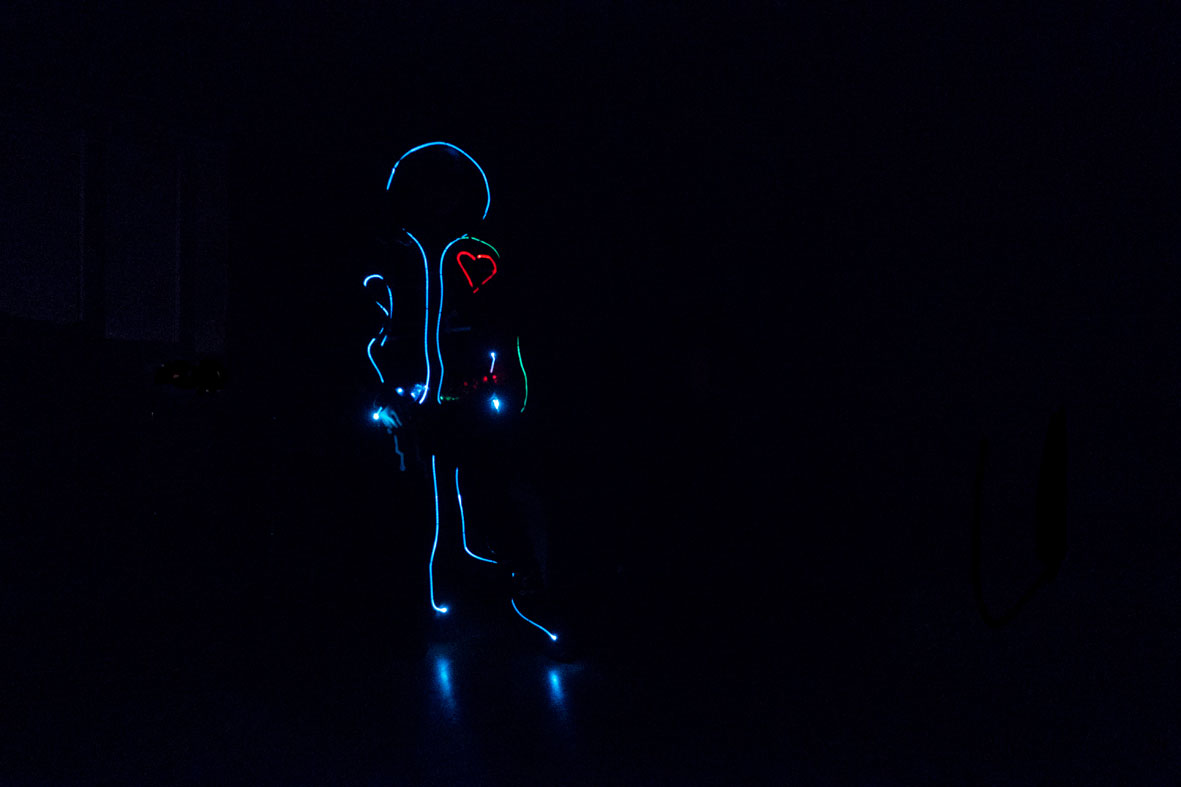
Our first working prototype - an overwhelming situation
Programming was mostly done in Python. A script is started automatically after boot and starts a simple TCP server listening on port 9999. This allows an external application to start the animation of all costumes at the same time. This synchronization app is running on an old, otherwise unused, laptop running Windows 7 which is connected to a Wi-Fi access point. This app was created C#, which is normally my main programming language. Additionally, the laptop was connected to the mixing desk via an XLR cable and provided the audio signal that was played on the sound system of our school hall. This setup enabled us to synchronize the music and the animation of the costumes.
On each costume, each of the three colors of each of the 8 LEDs are controlled using PWM (pulse-width-modulation) which allows us to choose our colors freely. Even though all Raspberry Pis only have a software PWM mode, the result is great and you can’t see any flickering with all 24 PWM pins turned on. The only other negative aspect of the software PWM mode is the higher CPU usage, about 1% each PWM-controlled pin. However, this was not an issue in this project, because we’re not doing any CPU-heavy calculations on the Raspberry Pis.
The software development itself (we’re a informatics project, after all…) did not take a lot of time, maybe a couple of days (after school) to gather some boilerplate code. The choreography was produced in about four weeks together with one of the teachers responsible for the dancing groups.
The following is an excerpt of the final script running on the costumes. All test, debugging and maintenance code was omitted for better readability:
#!/usr/bin/env python
# coding: utf8

# Script needs root privileges (gpio)!

import socket
import time
import os
import sys
import random
from threading import Thread
import RPi.GPIO as GPIO

channels = []
stop_coreo = False
got_sync = False

def coreography(sync):
    time.sleep(sync) # Wait for the beginning of the music

    ka0 = Thread(target=coreo_ka0)
    ka0.start()

    ka0_5 = Thread(target=coreo_ka0_5)
    ka0_5.start()

    # ... more coreography parts following ...

def coreo_ka0():
    time.sleep(0.183) # time until the start of this part
    flicker(4.137, 0, 100, 100, [ 1, 3 ])
    set_channels(channels, 0, 0, 0)
    flicker(4.137, 0, 100, 0, [ 4 ])
    set_channels(channels, 0, 0, 0)
    flicker(4.137, 100, 100, 0, [ 2 ])
    set_channels(channels, 0, 0, 0)
    flicker(4.137, 100, 100, 100, [ 5 ])
    set_channels(channels, 0, 0, 0)

def coreo_ka0_5():
    ch = [ channels[0], channels[1], channels[2], channels[3], channels[5], channels[7] ]
    time.sleep(37.424)
    # Code can be ran on one specific costume only:
    if get_costume_id() == 5:
        set_channels(ch, 100, 0, 0)
    time.sleep(4.137)
    if get_costume_id() == 2:
        set_channels(ch, 0, 100, 0)
    time.sleep(4.137)
    if get_costume_id() in [ 1, 3, 4 ]:
        set_channels(ch, 0, 0, 100)
    time.sleep(0.745)
    set_channels(ch, 0, 0, 0)

# ... more coreography parts ...

# Helper functions for special effects (example):
def flicker(duration, r, g, b, ids):
    global channels
    ch = [ channels[0], channels[1], channels[2], channels[3], channels[5], channels[7] ]

    if get_costume_id() not in ids:
        time.sleep(duration)
        return

    on = False
    passed = 0
    while passed < duration:
        step = random.randrange(20, 200)
        step = step / 1000.0
        passed += step
        if (passed + step) >= duration:
            step = duration - passed
            break

        if not on:
            set_channels(ch, r, g, b)
        else:
            set_channels(ch, 0, 0, 0)
        on = not on
        time.sleep(step)

# ... more special effects ...

def setup_coreo():
    global channels
    GPIO.setmode(GPIO.BOARD)
    channels = [
        # PINS                           IDX  DESCRIPTION
        create_channel(3, 5, 7),       # 0    Inner A | always use 1
        create_channel(11, 13, 15),    # 1    Inner B | and 2 together
        create_channel(19, 21, 23),    # 2    Trousers - outer fiber
        create_channel(29, 31, 32),    # 3    Trousers - inner fiber
        create_channel(33, 35, 37),    # 4    Heart
        create_channel(36, 38, 40),    # 5    Arm - upper fiber
        create_channel(22, 24, 26),    # 6    NOT IN USE
        create_channel(8, 10, 12),     # 7    Arm - lower fiber
    ]
    set_channels(channels, 0, 0, 0)

def cleanup_coreo():
    GPIO.cleanup()

def reset_coreo():
    global channels
    # Manual reset of all channels
    for ch in channels:
        ch[0].ChangeDutyCycle(0)
        ch[1].ChangeDutyCycle(0)
        ch[2].ChangeDutyCycle(0)

def create_channel(pin_r, pin_g, pin_b):
    GPIO.setup(pin_r, GPIO.OUT)
    GPIO.setup(pin_g, GPIO.OUT)
    GPIO.setup(pin_b, GPIO.OUT)

    pwm_r = GPIO.PWM(pin_r, 100)
    pwm_g = GPIO.PWM(pin_g, 100)
    pwm_b = GPIO.PWM(pin_b, 100)

    # Switch of all pins of this channel
    pwm_r.start(0)
    pwm_g.start(0)
    pwm_b.start(0)

    return (pwm_r, pwm_g, pwm_b)

# r, g, b: Values 0 (on) - 100 (off)
def set_channel(channel, r, g, b):
    if stop_coreo:
        sys.exit()
    channel[0].ChangeDutyCycle(r)
    channel[1].ChangeDutyCycle(g)
    channel[2].ChangeDutyCycle(b)

# r, g, b: Values 0 (on) - 100 (off)
def set_channels(channels, r, g, b):
    for ch in channels:
        set_channel(ch, r, g, b)

def get_costume_id():
    return int(os.uname()[1][9:])
    # Hostname has to be in format "picostume##"

# TCP server listening on port 9999

TCP_IP = '0.0.0.0'
TCP_PORT = 9999
BUFFER_SIZE = 128

def server():
    global got_sync, stop_coreo
    s = socket.socket(socket.AF_INET, socket.SOCK_STREAM)
    s.bind((TCP_IP, TCP_PORT))
    s.listen(1)

    conn, addr = s.accept()
    t = None
    while 1:
        data = conn.recv(BUFFER_SIZE)
        if not data:
            break
        sync = sync_token(data)
        if sync == 0:
            continue # Invalid token
        elif sync == -1 and t != None:
            print "received reset event, exiting!"
            stop_coreo = True
            got_sync = False
            cleanup_coreo()
            sys.exit(0)
        elif sync == -2 and t != None:
            print "received stop event"
            stop_coreo = True
            got_sync = False
            reset_coreo()
        # ... more maintenance events ...
        elif not got_sync:
            stop_coreo = False
            t = Thread(target=coreography, args=(sync,))
            t.start()
            got_sync = True
            conn.send("1")
            print "waiting x seconds to start coreography:", sync

    conn.close()

# Init GPIO and run server
setup_coreo()

print "SERVER started!"
server()

print "Coreo finished - cleaning up!"
cleanup_coreo() # Clean up
Most of the work was done in the months before the deadline set by our teachers. The majority of the electrical hardware was built by only three students (the core team), supported by other people from the course helping in this process. Also a big thanks you to the girls who helped us sewing, we would have been lost without you!
After a lot of work, everything getting more stressful in the final weeks, our costumes were used at three dancing shows in our school hall and performed quite well, except for a minor synchronization offset on one evening. Unluckily, on the last day two of the suits broke down and were not working at all.
In retrospective, the overall project went well. The 12V mobile power source gave us a lot of headaches, mostly from the financial side: 12V (non-rechargeable!) batteries are really expensive… Our lessons learned also included the importance of considering mechanical stress, even in IT projects it’s still important to think about it to avoid losing a lot of work (we had to completely rebuild the first three costumes).
The compulsory part of this project finished this summer. But what to do with five self-built costumes no one can control except us? The solution: We’ll form a new (now voluntary) group to upgrade the existing costumes and to implement a new choreography for the next dancing project. First plans, including the full replacement of the power source, are already being made…
Thanks for reading! If you have any questions about the project you can contact me via Twitter or E-Mail.